Lesson 6 - The 5 Architectural Layers of Information Systems

Your typical Enterprise Information System has at least five architectural layers.
Before we discuss these layers, let's look at a real-world use case that we are all familiar with; transferring money from one account to another using your mobile device.
Use Case - Summary
- The User opens the Banking app on their mobile device and is presented with a login page.
- The User enters login credentials and presses the Submit button.
- If successfully logged in, the User is presented with a list of accounts and tasks that can be performed on those accounts.
- The User presses the Transfer button and is asked to select the From-Account, and the To-Account, and enter the Amount to be transferred. The User presses the Submit button.
- If there are sufficient funds in the From-Account, the Amount is transferred to the To-Account.
- If not, the user is informed about the insufficient funds and no transfer takes place.
- The User logs out of the Banking app.
This is, in a nutshell, the process of transferring funds between two accounts.
Let us now look in more detail at what happens every time the User clicks the Submit button:
Use Case - Expanded
- The User opens the Banking app on their mobile device. This mobile app is the visual part of the bigger application that the User interacts with and is called the User Interface, or UI for short. For most users, the UI is the application, and they are usually blissfully unaware of what happens in the background.
- The User is presented with a login page.
- The User enters their login credentials and presses the Submit button. The pressing of the Submit button triggers a Request-Response cycle. So, upon the click of the Submit button, an Authentication request is sent to a Server (a fancy name for a big computer) that can be located anywhere in the world as long as it is connected to the Internet. Authentication is the process whereby the computer confirms that the user is who they claim to be. This Server takes this incoming request (which in our case contains the login User Login Credentials) and sends a query to the Bank's database to see if this User is an active user with the bank. Passwords are usually stored in an encrypted format in the database. So, the app takes the password received from the incoming request, encrypts it and then compares the encrypted version with the password against that of the particular user in the database.
- If the Authentication process fails, the Server sends a response back to the User to try and log in again.
- If the Authentication process succeeds, the User is regarded as authenticated and thus logged in.
- After authentication, the user gets Authorized, which is a process that determines what the user is allowed to do in the application.
- Once logged in, the User will be presented with a list of all his active accounts and authorized tasks that can be performed on those accounts.
- The User presses the Transfer button and is asked to select the From-Account, and the To-Account, and enter the Amount to be transferred.
- When the Submit button is pressed, a new transfer request is sent off to the Server. The Server contacts the database to determine if the From-Account has sufficient funds for the transfer.
- If there are insufficient funds for the transfer, a response is sent back to the User informing them of such.
- If there are sufficient funds, the From-Account is debited and the To-Account is credited. This transfer has to happen within the context of a single Transaction to ensure that both the accounts in the Database are updated accordingly. This allows for a Rollback of the whole process in case disaster strikes (e.g., power failure) before both actions can be completed. Don't worry about Transactions and Rollbacks at this stage. You will learn about them in due time.
- Once completed, a response is sent back to the User notifying that the transfer succeeded.
- The User logs out of the Banking app.
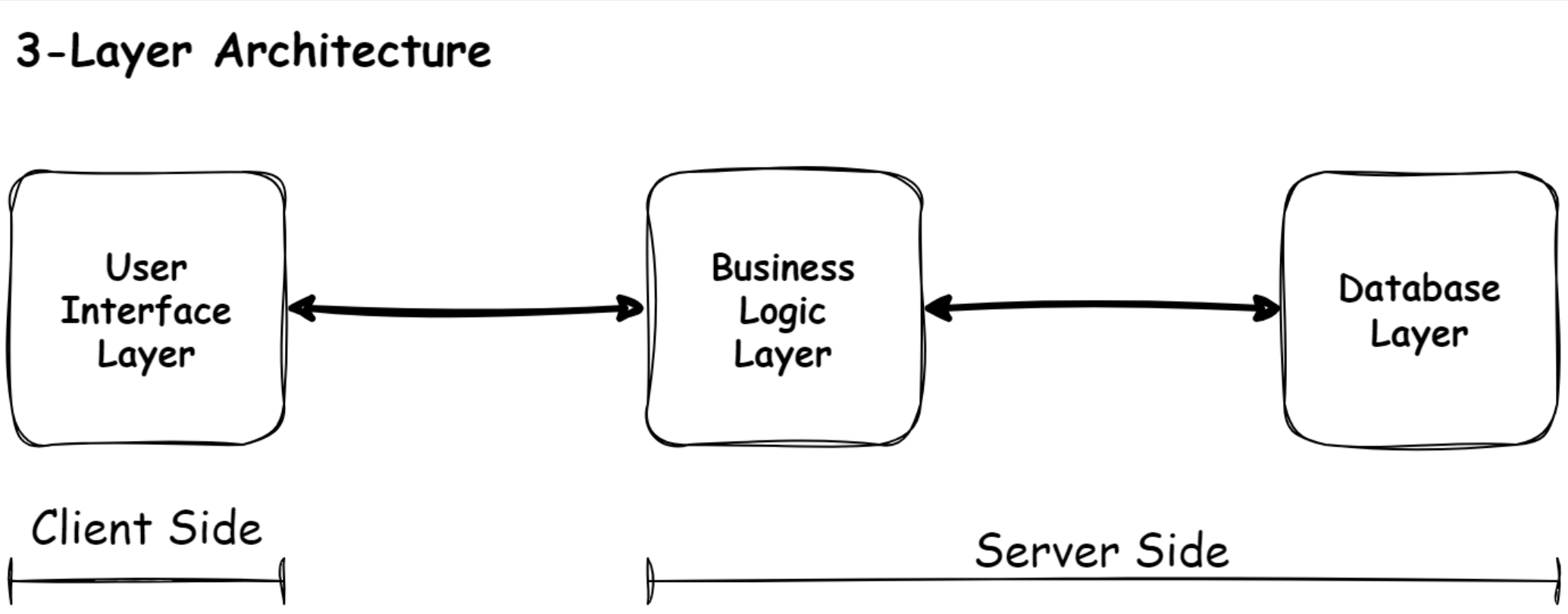
3-Layer Architecture
The Front End of an application deals with all the visible parts of the app and is called the User Interface, or UI for short.
All the code for this part of the app lives in the User Interface Layer.
The programming of this part of the application is called Client-Side programming.
Every time the Submit button is pressed, a new request is sent to the Server to do something clever.
This part of the system is called the Back End.
The programming of this part of the application is called Server-Side programming.
Most of the time, the Server depends heavily on the Database to provide it with the necessary data to do its processing.
The Server also regularly sends data to the Database to be stored for later use.
You have now encountered three of the five layers; the User Interface Layer (running on the Client's computer), the Business Logic Layer, and the Database Layer (both running on the Bank's computer).
User Interface Layer (aka Presentation Layer)
You have learned from the previous paragraphs that the User Interface Layer is part of the application which the User interacts with.
This part of the system runs on the User's mobile device, tablet, or PC.
Business Logic Layer
From the previous paragraphs, you have also learned that the Business Logic Layer is that part of the application where the actual work takes place.
The job depends on the businesses the application supports and can be anything from calculating Sales Tax, totaling all the items in an order, or querying the database for a list of books by the author.
Database Layer (aka Persistence Layer)
The database is the source of truth! No database, no business!
For example, data is essential for companies delivering intangible services such as insurance. I place a big emphasis on database design.
Sadly, sound database design is often neglected because the databases can be auto-generated these days by database migration tools.
I never use these migration tools in production.
I will explain why over time.
That doesn't make them bad.
They are just not for me.
I never feel in control when I use them.
Again, don't worry about this too much for now.
We will tackle this at the appropriate time.
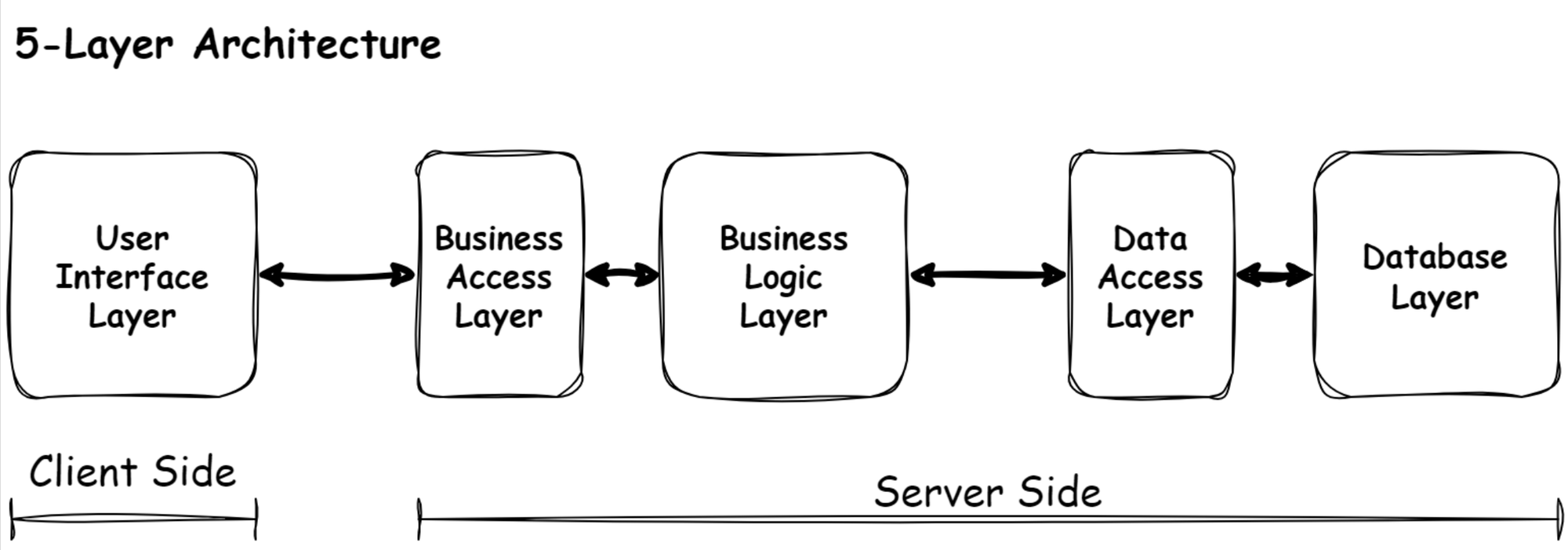
5-Layer Architecture
So, the User Interface Layer, the Business Logic Layer, and the Database Layer are the main layers you will encounter when building Information Systems.
However, two additional layers may or may not be present in Information Systems.
The code of these two layers is always present, but they may be mixed up with the application code of the other layers.
With simple systems, this may not be a bad thing, but when the system becomes bigger (and most systems do), you may regret not treating these as separate layers.
These two layers are the Access Layers, the Business Access Layer, and the Data Access Layer.
Business Access Layer
As explained earlier, the User's computer "talks" to the Bank's server.
The problem is that the Bank's server does a million little things. So how does the User's computer know how to communicate with the server?
This is where a well-defined Interface is handy.
Using a light switch as an example, you only have to know that the little button of the light switch can only do two things.
Flicking it up turns the lights on, and flicking it down turns the light off.
You don't care what happens behind the switch.
For all you know, little elves are running the show.
In the same way, we create an Interface that will allow the client side of the application to communicate in a pre-determined way with the server containing the Business Logic Layer.
We call this Interface the Business Access Layer as it helps the User Interface Layers access the Business Logic Layer.
Data Access Layer
As the server communicates with the database regularly, it helps to add an extra layer of code that makes it easy for the Business Logic Layer to communicate with the Database Layer. We call this the Data Access Layer.
When building small applications, one can probably get away with not using a Business Access Layer.
As most applications grow over time in size and complexity, it is usually a bad idea to ignore the Data Access Layer.
Programming languages and databases model objects differently.
The fancy name for this difference is the Object-Relational Impedance Mismatch.
We can either address this mismatch between the program objects and database objects manually, or we can use an Object-Relational Mapping (ORM for short) tool for the job.
Again, don't worry about this for now.
We will get to it in due time. For now, just know that the Data Access Layer makes it easier for our application code to talk to the database.
This is it for now regarding the 5 Architectural Layers of Information Systems.
Next, we will look at the difference between Layers and Tiers.